DeMarker Indicator for Binary Options and CFDs: The Ultimate Trading Guide

Having a reliable indicator at hand gives you an edge. Whether you are trading binary options or CFDs, working with a tool that can show you where the market can reverse will provide you with a lot of trading opportunities. Beginners often jump from one indicator to another, trying to find one that is not lagging or repainting. If you are looking for such a tool, you are in the right place. In this article, we will break down the DeMarket indicator and show you its key benefits and features that will be helpful to build a well-developed system. Also, we will share some basic strategies that you may grab and start using right away.
Contents
- 1 What Is the DeMarker Indicator?
- 2 The Formula: How DeMarker Is Calculated
- 3 Comparison Table: DeMarker vs. RSI vs. Stochastics
- 4 How to Set Up the DeMarker Indicator on the Binolla Platform
- 5 Use the DeMarker Indicator with Binolla
- 6 Powerful DeMarker Strategies for Binary Options and CFDs
- 7 Recommendations for Using the DeMarker Indicator
- 8 Common Mistakes When Using DeMarker
- 9 Conclusion
- 10 FAQ
- 10.1 Is the DeMarker indicator good for binary options?
- 10.2 What is the best setting for DeMarker on H1?
- 10.3 Can I use DeMarker for 1-minute binary options?
- 10.4 Which assets work best with DeM?
- 10.5 Why does DeM sometimes stay overbought for 5–6 candles?
- 10.6 What should I do if DeM gives a signal, but the price is at a key resistance level?
What Is the DeMarker Indicator?
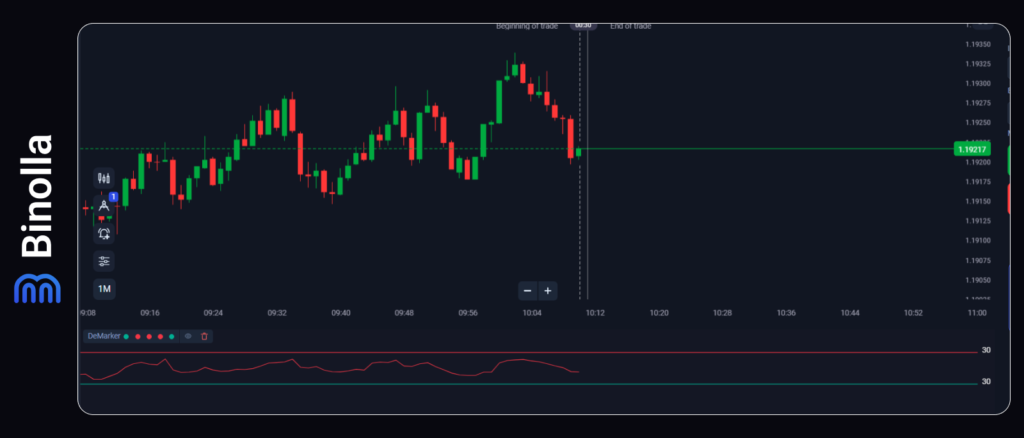
The DeMarker indicator is a momentum technical analysis tool that measures the demand for an asset by comparing the recent prices with the previous price action. The author of the indicator used it to measure buying and selling pressure before price exhaustion. However, unlike most momentum indicators, DeMarker focuses on high and low relationships rather than closing prices. The key features of the indicator include:
- The line of the indicator oscillates between 0 and 1.
- The tool has two key levels: 0.7 for overbought and 0.3 for oversold.
- DeMarker reacts faster than RSI to price changes in trending markets, but it is still less volatile compared to Stochastic.
- The indicator is perfect for ranging markets, which is ideal for binary options.
Binary options are about predicting the direction of the price within the period before expiration, which means that by applying DeMarker, you will have an edge, as you will be able to see price exhaustion moments and capitalize on them.
The Formula: How DeMarker Is Calculated
While you don’t need the DeMarker formula to work with the indicator, as everything is calculated automatically, understanding it will help you learn how the indicator works and how it behaves differently compared to other momentum tools.
DeMarker = SMA (DeMax, N) / SMA (DeMax, N) + SMA (DeMin, N)
Where:
- N – the period of the indicator (basically, traders use 14);
- SMA stands for Simple Moving Average;
- DeMax = (Current High – Previous High);
- DeMin = (Previous Low – Current Low).
Comparison Table: DeMarker vs. RSI vs. Stochastics
How to choose between DeMarker, RSI and Stochastic? If you ask yourself the same question, then check our table below.
| Feature | DeMarker (DeM) | RSI (14) | Stochastics (5,3,3) |
| Primary focus | High/low progression | Closing price momentum | Closing speed |
| Typical range | 0–1 (0–100) | 0–100 | 0–100 |
| Overbought level | 0.70 (70) | 70 | 80 |
| Oversold level | 0.30 (30) | 30 | 20 |
| Lag in H1 trends | Low | Medium | High (whipsaws) |
| Divergence accuracy | High (fewer fakes) | Medium | Low |
| Best for binary options | Yes (reversals & continuations) | Medium (laggy) | No (too noisy) |
| Best for CFD swing trades | Yes | Yes (with smoothing) | No |
How to Set Up the DeMarker Indicator on the Binolla Platform
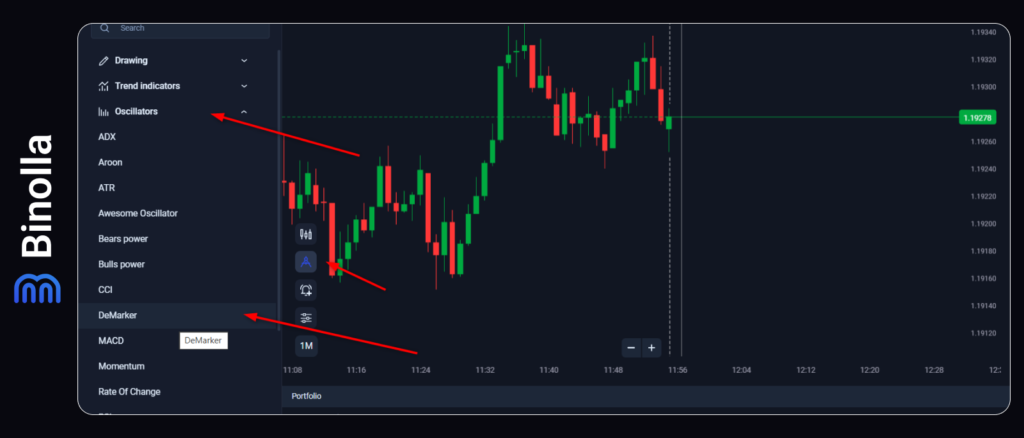
To start using the indicator, you should add it to the Binolla platform first. To do that, you need to:
- Click on the tools icon on the left side of the chart.
- Pick Oscillators from the top menu.
- Select DeMarker in the Dropdown menu.
Now you are ready to use the indicator.
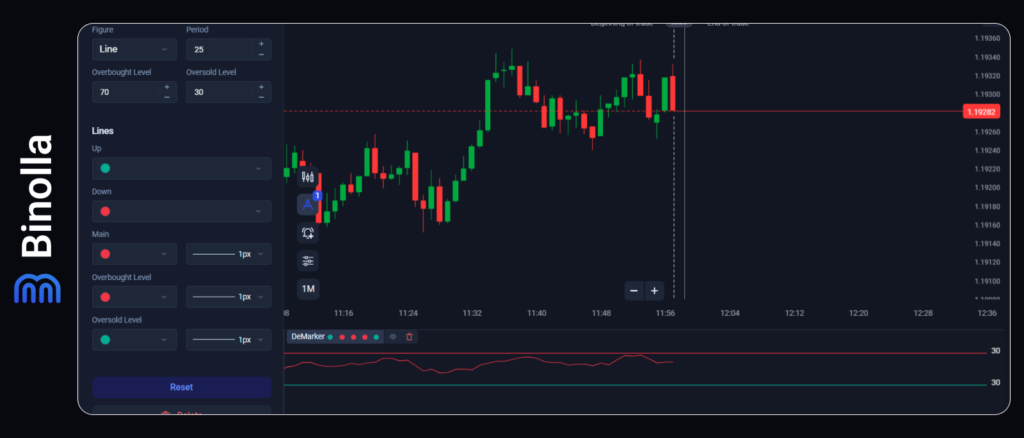
Traders can use the indicator by default with pre-set settings. These settings were used by Tomas Demark, the inventor of the tool. However, you can also adjust settings according to your expectations.
Changing Overbought and Oversold Lines
The first setting that we are going to consider is overbought and oversold lines. They are set at 0.7 and 0.3 by default. By changing these values to 0.6 and 0.4, you may expect even more signals as the price will reach zones above 0.6 and below 0.4 more frequently. However, you should think about the quality of such signals. Thus, even minor fluctuations may provoke such breakouts, which means that the number of false signals may increase.
If you set the overbought to 0.8 and the oversold to 0.2, then you can expect fewer signals with higher quality. However, you may miss some movements during the day that you could capitalize on. Therefore, it is up to you to decide.
DeMarker Period Value
Another thing that you can change when using DeMarker is the period. It is set to 14 by default, meaning that it takes 14 previous candles when calculated. Again, if you lower this value, you will make the indicator more sensitive to minor changes as fewer candles will be used in calculations. This will lead to sharper line movements and may give you a bit more signals. However, you should be prepared for more false signals as well.
When increasing the period above 14, you will smooth the DeMarker line. This, in turn, will give you fewer signals, and you can miss some trading opportunities.

Use the DeMarker Indicator with Binolla
Add the indicator and trade with a reliable brokerage
Start nowPowerful DeMarker Strategies for Binary Options and CFDs
Now that you know all the basics about the indicator, time to move further and watch some interesting strategies that you can apply. The first one uses DeMarker horizontal levels that show whether the price is overbought or oversold.
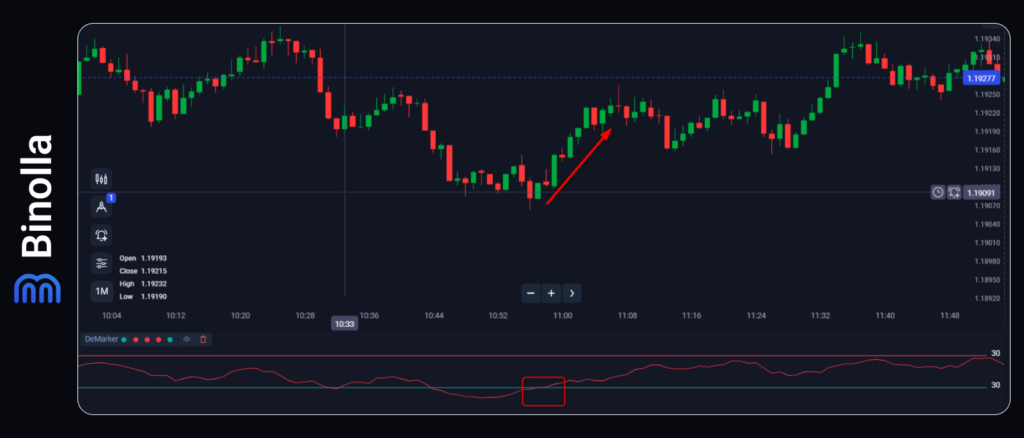
So first, we are going to see how to behave when the price is leaving the oversold area. Check the screenshot above. You see that the DeMarker line is moving higher from the oversold area and finally breaks above 30 (0.3). Binary options traders can buy a Higher contract in this case, while CFD traders simply press the Buy button.
For binary option traders, this means waiting for the expiration moment by checking fluctuations. CFD traders have some additional options like placing stop losses and defining targets. The DeMarker indicator can’t tell you anything about targets or stops. However, you can place a stop loss just below the local low level.
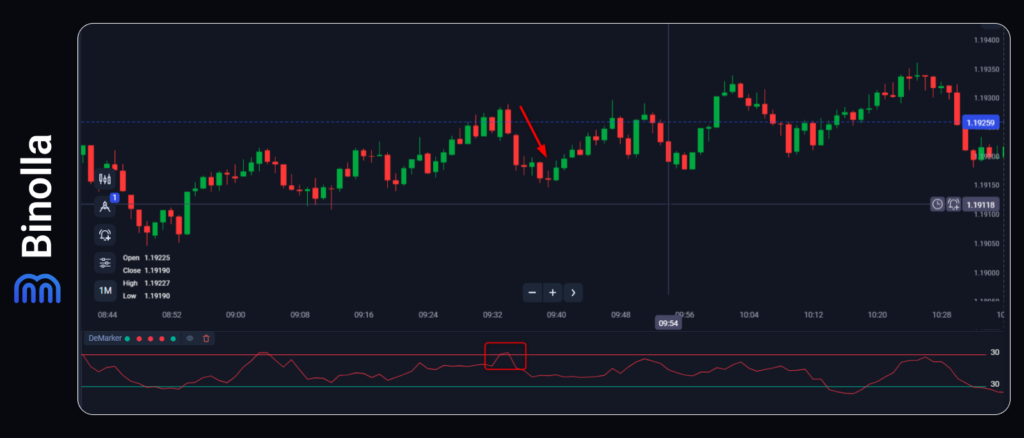
Next comes the strategy to buy a Lower contract or simply sell when you trade CFDs. Wait for the indicator line to go below 0.7 (or 70, depending on the platform) and then press the button. If you trade binary options, that’s all, meaning that after you place a trade, you simply watch the trade develop towards the expiration moment.
When trading CFDs, you can place stop losses and take profits. Again, the indicator itself does not provide you with any cues about how to manage your risk. However, you can place a stop loss order right above the current local high.
DeMarker Divergence in Trading
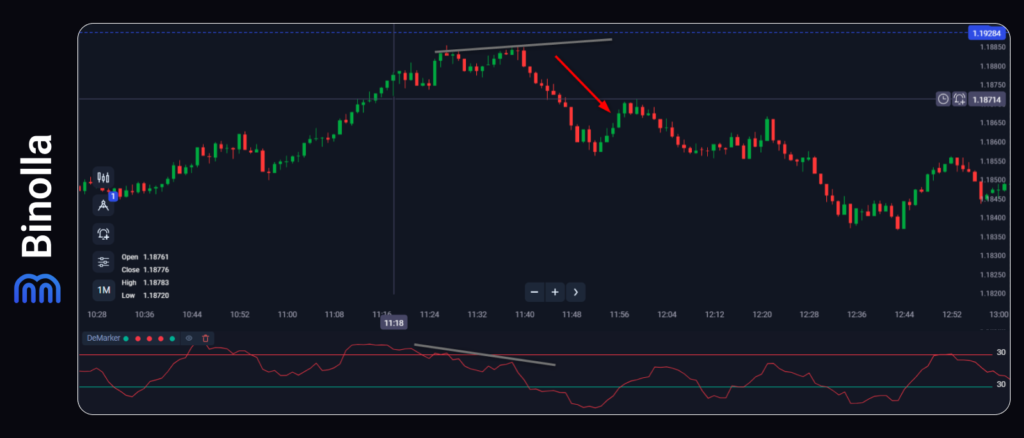
A bearish divergence signal
DeMarker divergence is similar to all other known divergences that you can find when trading with all momentum indicators. When the price sets new highs, while the indicator points to lower highs, then you can sell an asset or buy a Lower contract. In our situation, we have both conditions, which means that we have a standard divergence. CFD traders can place stop losses right above the local high.
Recommendations for Using the DeMarker Indicator
To trade with the DeMarker indicator successfully, you should follow some rules:
- Wait for the candle to close before placing a trade. Do not act on DeMarker during an unfinished candle, as the price may go in the opposite direction, which will cancel the signal. The confirmation is the key.
- Combine DeMarker with trend filtering indicators. Use the simple moving average or other trend indicators to confirm the price direction and find dynamic support and resistance levels. You can alternatively use standard support and resistance lines.
- Trade during high-liquidity sessions. This will give you more confirmed signals. The best session is the London and New York overlap. When trading during the Asian session, you can have more false signals.
- Keep a trading journal. Record your trading with DeMarker to examine your trades later and find some new interesting patterns.
- Try the indicator on demo first. Before trading with real money, test the indicator with virtual funds. This will allow you to check how the indicator works and adapt it to your strategy.
- Set alerts. Use alerts on the Binolla platform that will tell you when the price reaches some levels instead of watching the screen.
- Check the economic calendar. To avoid unpredictable moves, check whether important news is released during your trading session.
Common Mistakes When Using DeMarker
When the indicator is reliable and simple, traders sometimes make mistakes. Here are the most common ones and recommendations on how to avoid them:
- Trading in the neutral zone. When the indicator is between 0.3 and 0.7, it is not recommended to trade at this moment. Wait for DeMarker to move above 0.7 or below 0.3 to find signals.
- Entering before DeMarker crosses back. Another mistake is that traders often press Lower when the price is still in the overbought zone or press Lower when it is in the oversold area. Wait for crosses to enter the market.
- Ignoring the market context. When the overall trend is up, and you try to enter on the crossing of the overbought line is risky. However, binary options traders can take this risk, but they should choose shorter expiries.
- Overtrading after a loss. Sometimes, traders open a lot of trades after losing money. You should take a pause to calm your emotions before trading again.
- Forgetting about divergences. Some traders only use overbought and oversold levels, forgetting about divergence. Thus, they miss powerful signals.
- Trading all assets the same way. You should check the behavior of Forex assets, cryptocurrencies, gold, and indices before developing your trading strategies.
- Moving stops wider. CFD traders sometimes move stops wider after the cross. By doing this, you will increase your risk per trade.
- Believing the indicator works in all market conditions. The best way to use the indicator is when the market is ranging. If there is a strong trend, even if the indicator leaves oversold and overbought areas, a correction may be too short.
Conclusion
The DeMarker indicator is a great tool that helps traders capitalize on market reversals and corrections. However, like any other technical analysis tool, it comes with its benefits and drawbacks. Knowing them will help you better apply the indicator in your strategies. To use it successfully, you should check the context, wait for confirmation, and use stop loss and take profit orders when trading with CFDs.
FAQ
Is the DeMarker indicator good for binary options?
Yes, this is an excellent indicator for binary options, as this instrument cares about direction over fixed time. The indicator provides timely entry signals with minimal lag.
What is the best setting for DeMarker on H1?
Period 14 is the most popular setting for overbought and oversold. Moreover, professional traders often use 30 and 70 lines to outline oversold and overbought conditions.
Can I use DeMarker for 1-minute binary options?
Yes, the indicator can be used for any expirations from seconds to hours. However, you may need to adjust the indicator settings to improve your strategy’s profitability.
Which assets work best with DeM?
Traders can choose from major FX currency pairs, gold and indices. However, it is recommended to avoid low-liquidity assets like some exotic cryptos or pairs.
Why does DeM sometimes stay overbought for 5–6 candles?
This indicates that the uptrend is very strong. In this case, you should not try to reverse-trade. You should apply trend-following strategies instead.
What should I do if DeM gives a signal, but the price is at a key resistance level?
You should respect the resistance and combine signals with price action and other strategies for higher confidence.