Binolla Updates: Pending Orders and Rewards for Active Traders
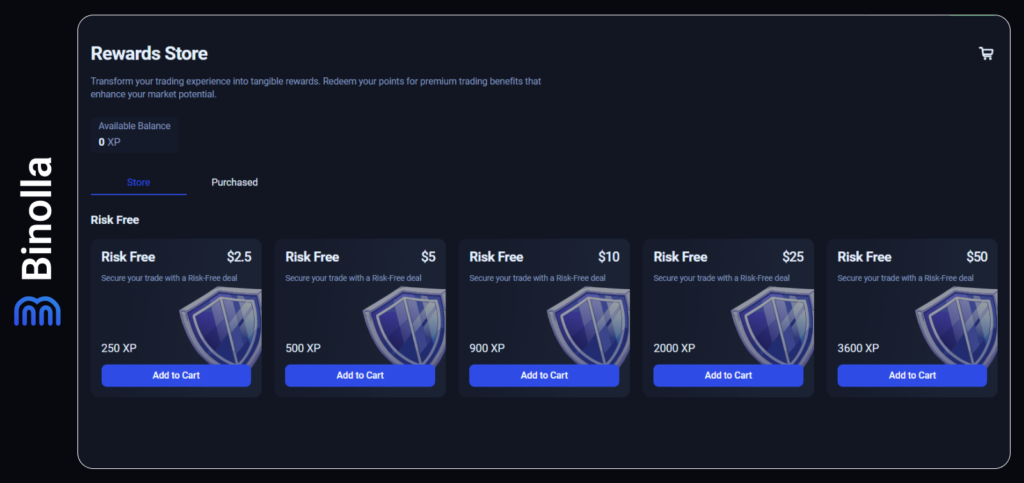
The Binolla team launches a rewards system allowing active traders to gain XP (experience points) and exchange them for risk-free trades and other valuable prizes later. The more you trade, the more points you will get. Once you receive a minimum threshold, you can spend it in the Rewards Store on the Binolla platform.
Automate Your Strategies with Pending Orders
We have added the pending order feature, allowing you to partially automate your trading routines. With this option, you don’t need to sit in front of the platform all the time waiting for a signal. The pending order allows you to open a position at a desired price above or below the current one, and once the price reaches the set level, the trade will be opened according to your parameters.
Examples of Using Pending Orders in Trading
Pending orders can be very helpful and may enhance your trading strategy and save you time as you are not required to monitor the charts all the time anymore. Find out more about when you can apply them:
- The EUR/USD currency pair is currently trading at 1.1494, and you expect it to reach the resistance level where it may reverse downwards. In order not to wait for this event to occur, you can place a Lower pending order by indicating the 1.1500 level as the entry point. You also set an investment amount for the trade and the expiry time. Once the price reaches it, a Lower contract will be activated. If the price of the asset is below 1.1500 at the moment of contract expiration, then the trade will be closed in the money.
- The GBP/USD currency pair is trading at 1.3310 at the moment, and you expect it to start growing in five minutes after an important data release. In order not to wait for the event to occur, you set an open time at the exact time when the contract should be bought. The trade will be executed exactly at the time that you set.
How to Set a Pending Order at Binolla
Placing a pending trade at Binolla is very simple. This is how it works.
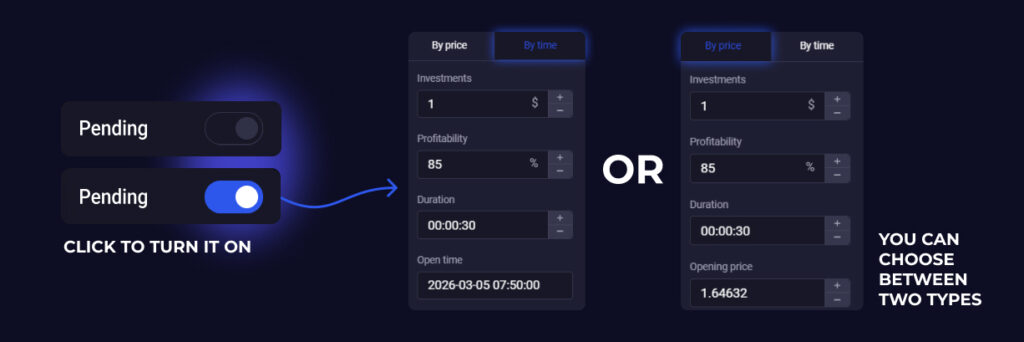
- Click on the Pending switcher to open the menu.
- Set the investment amount and expiration.
- Indicate the price at which you want to buy a contract.
- Click on Higher or Lower depending on what contract you want to buy.
Additionally, you can set the profitability level. If you do that, the order will be opened if and only if the profitability of the contract is equal to what you set in the Pending order menu.
Also, you can set up a time when the order will be opened. In this case, the contract will be bought at a certain moment (regardless of its current price).